Så hänger det ihop
Ditt SvenskPlayTV-abonnemang är en spellista (M3U eller Xtream Codes) som du öppnar i en IPTV-app på din enhet. Appen sköter uppspelningen – abonnemanget ger dig kanalerna, filmerna och programguiden.
1. Why TiviMate is the Premium Choice
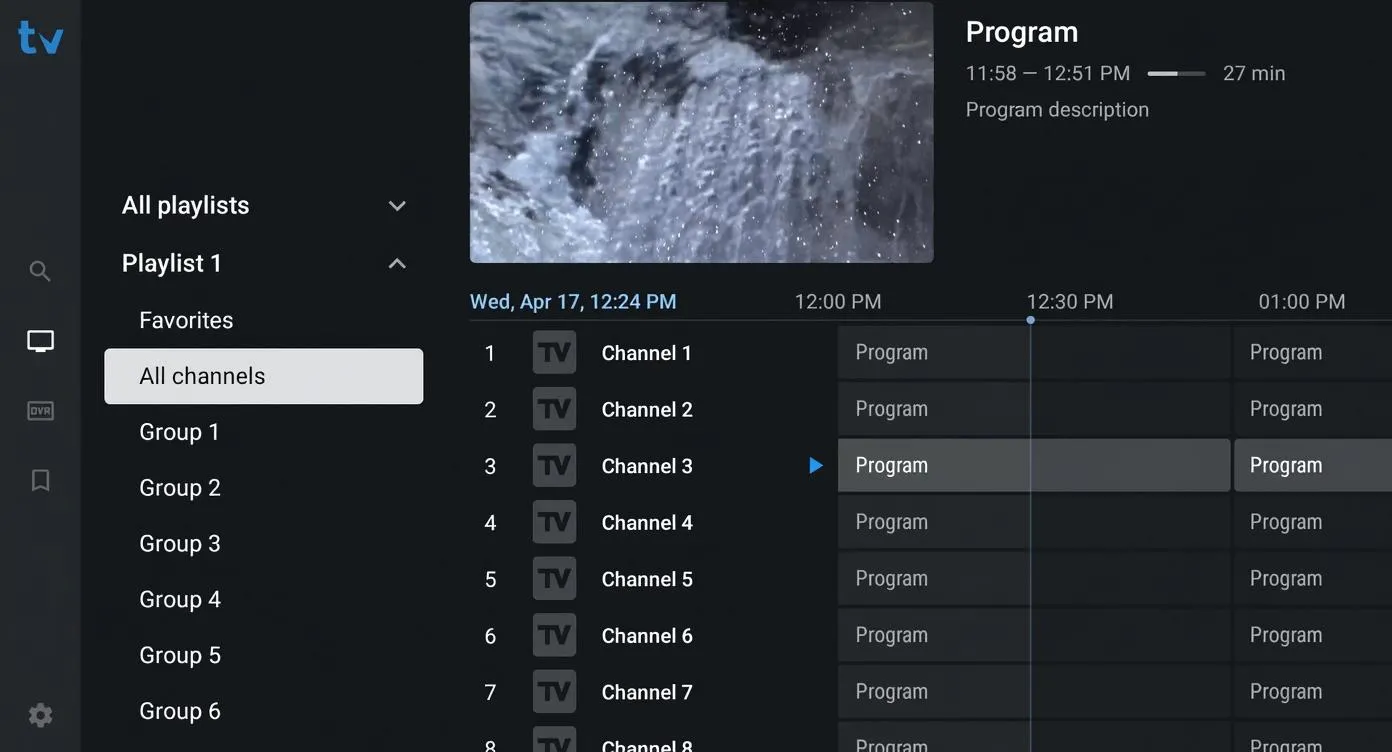
Among the various IPTV player applications available on the market today, TiviMate stands out as the most polished and feature-rich option. Designed specifically for television screens, it offers a premium user interface resembling high-end satellite or cable guides, complete with detailed electronic program guide (EPG) grids, multi-view setups, and direct playlist management.
While TiviMate acts strictly as a media player and does not provide content, pairing it with a high-speed IPTV playlist gives you access to thousands of live feeds and VOD assets.
2. Enable Developer Sideloading Options
Because TiviMate APK is distributed directly as a package, you must first enable your streaming hardware to authorize sideloaded applications. Follow these quick preparation steps on your Firestick or Android TV box:
- Navigate to the Settings menu on your device home screen.
- Select My Fire TV or Device Preferences / System.
- Click on Developer Options. *(If missing, go to "About", select your device model name, and click it exactly 7 times until you see a "You are now a developer" notification).*
- Toggle the Install Unknown Apps or Apps from Unknown Sources option to ON.
Prova gratis i 24 timmar
En gratis testlinje per hushåll, fullt utbud och inget kort krävs. Eller se priserna för 1 och 2 enheter direkt.
3. Install TiviMate via Downloader Utility
The official, secure method to fetch the player package is using the Downloader utility app available in the device store:
• Enter code 272483 into the URL text box.
• Click Go to automatically download the APK.
Once the package completes downloading, the device installer will trigger. Click Install, and once completed, select Delete to clear the temporary APK file from your streaming device's limited flash storage space.
4. Connect Your IPTV Playlist & API
Once the application is installed, launch it. You will be greeted with the main welcome panel. To configure your premium playlist, follow these instructions:
- Click Add Playlist inside the main welcome view.
- Choose Xtream Codes API as the connection type (this is highly recommended over standard M3U paths as it structures categories and speeds up server sync).
- Enter your unique active credentials (obtained via your setup email): Server URL: http://your-server-url.com:port Username: [Your Username] Password: [Your Password]
- Check the option to include VOD / Movies and click Next or Apply to import channels.
- Optionally add your EPG URL in the program guide settings if it is not populated automatically by your playlist profile.
5. Buffering & Streaming Performance Tuning
If you experience packet dropouts or network delays, you can optimize TiviMate's video player engine parameters to ensure seamless 4K/HD streaming:
- Adjust Buffer Size: Navigate to Settings → Playback → Buffer Size. Adjust this parameter from "None" or "Normal" to "Large" or "Very Large" to pre-cache incoming segments.
- Configure Video Engine: Toggle the Hardware Decoding setting to ON to force your streaming box's graphics chip to process video signals, reducing CPU load.
- Audio Output Passthrough: If you experience sync delays between video and audio channels, enable the Audio Passthrough option inside the Playback settings panel.
Redo att börja titta? Testa gratis i 24 timmar
En gratis testlinje per hushåll. Betalda abonnemang från $14.98 har 7 dagars nöjd-kund-garanti och aktiveras direkt när betalningen registrerats.
RecensionerLooking for the best free IPTV apps? We review Smarters Pro, TiviMate, and Sparkle TV free versions — and explain why premium paid players like HotPlayer and TiviMate Premium are always the better choice.
RegionaltFind the best IPTV in Stockholm. Access 40,000+ live channels, local broadcasts, and regional sports networks in 4K. Overcome ISP throttling in the Stockholm region.
RegionaltFind the best IPTV in Gothenburg. Access 40,000+ live channels, local broadcasts, and regional sports networks in 4K. Overcome ISP throttling in the Gothenburg region.